


Libération: Info et Actualités
3.435.00 Reviews
App Specs
- Version
- 7.5.2
- Updated On
- License
- Free
- Downloads
- 500,000+
- Developer
- Libération
- Categories
- News & Magazines
- Platform
- Android, iOS
Screenshots





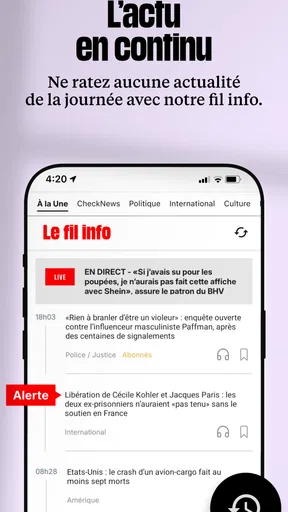
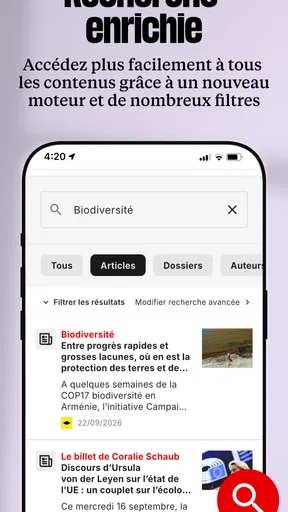
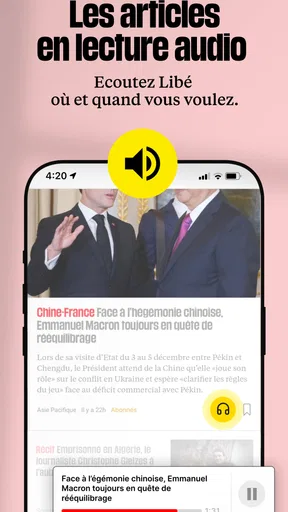
 Analysis by AppCompare
I judge a news app less by how many headlines it can put in front of me than by whether it helps me understand what is happening without turning every spare minute into a scroll. Libération: Info et Actualités is built around journalism from the French newspaper Libération, with coverage that reaches beyond France. In my experience, its appeal is strongest when I want context and commentary as well as a quick sense of the day’s news.
Reading Libération at my own pace
The first impression is of a straightforward reading experience: the interface gives the articles room to take the lead, and the sections make it easier to move between subjects. That matters when I open a news app with a particular question in mind rather than a desire to browse everything. Libération is a free News & Magazines app developed by Libération, though in-app purchases range from $0.99 to $109.99 per item, so I would check what an offer covers before committing to it.
The app has an average rating of 3.4 from around 4,200 ratings, and more than 500,000 installs. I take those figures as useful context, not a substitute for deciding whether its editorial voice suits me. It is rated for Everyone 10+, and its current version is 7.5.2. For a reader interested in French public affairs and international coverage, the name behind the app is a meaningful part of the experience: this is not simply a neutral headline aggregator presenting outlets as interchangeable sources.
What the reporting gives me
The articles are the main reason I would keep it installed. The coverage spans subjects such as politics, culture, and technology, while the reporting often aims to go further than a one-line update. I find that useful when a story has consequences that are not obvious from its headline. Instead of treating every item as a disposable alert, I can spend a few minutes with a report and come away with a better grasp of the issue.
Opinion writing adds another layer, but it is worth approaching it as opinion rather than as a replacement for straight reporting. I like having analysis beside news because it can clarify what is being argued about, even when I disagree with the point of view. If I am researching a sensitive or fast-changing story, I would still compare coverage from other publications. That is a sensible habit with any outlet, and particularly helpful when a strong editorial perspective is part of what makes a publication distinctive.
Notifications and a practical reading routine
Customizable notifications can help me keep alerts relevant instead of allowing every update to interrupt the day. My practical tip is to be selective: alerts are most useful for subjects I genuinely need to follow, while broader browsing can wait until I choose to open the app. This keeps the phone from deciding that every developing story deserves my immediate attention.
For example, I might check the app over breakfast for a sense of what is happening, then open a longer article during a commute when I have time to concentrate. If I know I will have a patchy connection, the offline-reading option gives me a way to prepare by downloading articles beforehand. I would treat that as a small planning step, not assume every item will already be available without a connection. Saving an article for later also works well when a piece looks worthwhile but I do not have the attention to read it properly in the moment.
Worth Reading Before You Choose

EA SPORTS FC Mobile 26 Is a Bigger Football Game, but It Takes Time

Flipboard Shows What News Apps Must Do Beyond the Feed

Switching to Android Auto Means Rethinking Your Driving Routine

Google Calendar Makes a Crowded Week Easier to Manage

Ludo King Makes the Most of the Minutes Between Plans

Baby Panda World Brings Quick Play to Modern Phones, but Its Game Library Feels Busy
Discussion, bookmarks, and the trade-offs
The comments area gives readers a place to respond to stories and encounter other views. I appreciate discussion most when it adds a perspective I had not considered, though comment quality can vary from one conversation to another. I would read it as a supplement to the journalism, not as evidence that a claim in an article is true. If I want a quiet reading session, it is easy enough to focus on the article itself and leave the debate for another time.
Bookmarks are useful for a less obvious reason than simple convenience: they let me separate articles I want to think about from the stream of daily updates. I can save a substantial report during a short break and return to it when I have enough time to follow its argument. That is a better workflow than opening several long pieces at once and losing track of them. The trade-off is that saving an article does not make the news feed itself less busy; it just gives me a way to manage my own reading.
Speed, reliability, and device expectations
I would approach performance with ordinary expectations for a publication app: the time it takes to get into a story can depend on the connection and the amount of content being loaded. The design described in my use feels oriented toward reading rather than elaborate visual effects, which is a good fit for checking articles quickly. I would not judge the app by a single slow moment on a weak connection, but if loading repeatedly interrupts your reading, that friction matters more than a polished first impression.
Heavy-use moments are different from a quick headline check. Moving between sections, opening several reports, and reading comments can make a session feel busier, so I prefer to use notifications as a prompt and then choose one or two stories to read carefully. Offline downloads can help when connectivity is the obstacle, provided I prepare the pieces in advance. They are also a practical reminder that reliable access on a commute depends partly on what I have saved before leaving.
Libération’s app has been available since December 22, 2010, and the current version is 7.5.2. It requires Android 6.0 or later. Those details make it easier to judge basic compatibility, but they do not tell me how smoothly every device will run it. On an older or constrained phone, I would keep my expectations modest and pay attention to whether everyday reading feels comfortable rather than assuming a particular battery or data impact. I would also check the purchase details carefully if I encounter paid options; the app itself is free, but some in-app items have a substantial price range.
Who will get the most from it?
I would recommend giving it a try if you follow French news, value reported features and editorial perspectives, or want an app tied to a publication rather than a mixed feed of headlines from many sources. It can suit a reader who checks in several times a day but prefers to read a few pieces in depth instead of endlessly refreshing. It is also useful for someone building a reading habit: save a longer article when busy, then return to it when there is time to focus.
It may be less suitable if your priority is a broad, highly customizable roundup across many publishers, or if you want only brief alerts and no commentary. A general news aggregator can be a better choice for comparing outlets in one place; a dedicated outlet’s app is better when you want a consistent editorial identity and its own reporting. If you are looking for English-first coverage, consider whether French-language journalism fits your routine before making it your main news source. These are differences in purpose, not flaws that a single app can solve for everyone.
My verdict on the experience
So, what’s the first thing that hits you when you open Libération: Info et Actualités? It’s the sleek and user-friendly interface. I mean, who doesn’t love an app that’s easy on the eyes? The design is minimalistic, letting the news take center stage, which is exactly what you’d want in a news app.
Beyond looks, the app houses a rich variety of content. Whether you’re into politics, culture, or the latest tech trends, Libération’s got you covered. It’s like having a digital newspaper at your fingertips, minus the ink stains. You can easily toggle between sections, making navigation a breeze.
Content that Keeps You Hooked
Let’s talk about the heart of the app—the articles. What I found impressive is the depth and breadth of the reporting. The journalists really dig into the stories, offering insights that go beyond the headlines. It’s not just about feeding you information; it’s about making you think.
One feature I particularly enjoyed is the editorial section. The opinions are well-crafted and thought-provoking, perfect for those moments when you want to dive deeper into the issues. Trust me, you’ll find yourself nodding along or maybe even furrowing your brow in thoughtful disagreement.
Staying Updated with Ease
Now, I’m someone who likes to be in the loop, and Libération makes this ridiculously easy. With customizable notifications, you can tailor the app to alert you about the topics that matter most to you. No more sifting through endless articles to find your interests—it’s all right there, curated just for you.
And for those of us who are always on the move, the app offers offline reading. Just download the articles you’re interested in, and boom, you’ve got your reading material sorted for that subway ride or flight.
Interactive Features and Community
Here’s where Libération gets a bit more interactive. The app includes a comments section that’s surprisingly engaging. Unlike some platforms where comments can be a bit of a free-for-all, the discussions here are generally respectful and insightful. It’s like having a mini-debate club in your pocket.
Moreover, there’s a nifty feature where you can save articles for later. Whether it’s a deep dive into climate change or the latest cultural critique, you can bookmark these gems and revisit them whenever you like. It’s perfect for those lazy Sunday afternoons when you want to catch up on saved reads.
Final Thoughts
So, if you’re asking me whether Libération: Info et Actualités is worth a spot on your phone, I’d say absolutely. It’s not just another news app; it’s a comprehensive tool that keeps you informed and engaged. With its intuitive design and rich content, it’s a must-have for news enthusiasts.
Whether you’re a news junkie or just someone who likes to stay informed without the fuss, Libération offers a refreshing experience. So go ahead, give it a whirl, and let me know if you end up loving it as much as I do!
Pros
- User-friendly interface with intuitive navigation.
- Comprehensive news coverage across categories.
- Regular updates keep content fresh.
- Offline reading mode is highly convenient.
- Customizable notifications for tailored alerts.
Cons
- Occasional ads can disrupt reading experience.
- Some features require a subscription.
- Limited multimedia content in articles.
- App size may be large for some devices.
- No dark mode option available yet.
FAQs for Libération: Info et Actualités
What features does the Libération: Info et Actualités app offer?
The Libération app provides users with access to the latest news and in-depth articles across various categories, including politics, culture, and technology. It features interactive content, push notifications for breaking news, and offline reading capabilities, making it a comprehensive tool for staying informed on the go.
Is the Libération app available for both Android and iOS devices?
Yes, the Libération: Info et Actualités app is available for download on both Android and iOS platforms. Users can easily find and install the app from the Google Play Store or the Apple App Store, ensuring accessibility regardless of their device preference.
Does the Libération app require a subscription for full access?
While the app offers a range of free content, some articles and features may require a subscription for full access. Users can choose from various subscription plans that provide unlimited access to premium content and additional features, enhancing their reading experience.
How does the Libération app handle user privacy and data security?
The Libération app is committed to user privacy, implementing robust security measures to protect personal data. The app adheres to GDPR guidelines, ensuring that user information is handled with care. Users can review the app's privacy policy for detailed information on data management practices.
Can users customize their news feed on the Libération app?
Yes, the Libération app allows users to personalize their news feed by selecting preferred categories and topics. This customization enables a more tailored news experience, ensuring that users receive updates and articles that align with their interests and preferences.


